Your dedicated Project Zomboid server, by the hour, no subscription.
Spin up a Project Zomboid server in minutes and survive Knox Country together. Billed by the started hour, your world is archived between sessions — and the server shuts down when nobody plays.
Ready in minutes · stop in 1 click · €0 when off · 🎁 first hour of play free
Project Zomboid in 5 numbers
- RAM
- 8 GB (recommended tier)
- Measured over 27 real sessions: 8 GB for 6 players, no mods (surveyed in September 2026).
- Evening with 4 players, 4 h
- €0.12
- 4 h × €0.03/h on the 8 GB tier. The price follows RAM, not player count.
- Open ports
- 16261, 16262, 8766, 8767
- Port to enter in the game: 16261.
- Players
- 1 to 32 slots
- 16 slots by default, adjustable on your server. The price does not depend on player count.
- Billing
- Per started hour
- First hour of play free for new accounts. €0 when the server is off.
Why a Project Zomboid server with TickServ
Dedicated Build 42 server, multiplayer included
Steam Workshop mods: paste the IDs, the server handles the rest
Built-in admin console (players, messages, saving, bans)
Automatic shutdown when nobody plays: €0 while off
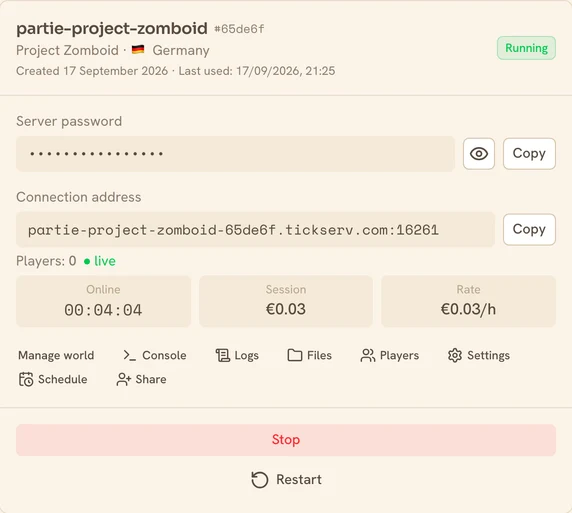
Project Zomboid pricing
Billed by the started hour, based on RAM and performance. Server off = €0.
| Performance | vCPU | RAM | Price / hour |
|---|---|---|---|
Eco shared vCPU | 2 | 4 GB | €0.02/h |
Eco shared vCPU | 4 | 8 GB | €0.03/h |
Eco shared vCPU | 8 | 16 GB | €0.06/h |
Eco shared vCPU | 16 | 32 GB | €0.10/h |
Dedicated CPU dedicated vCPU | 2 | 8 GB | €0.10/h |
Dedicated CPU dedicated vCPU | 2 | 16 GB | €0.13/h |
Dedicated CPU dedicated vCPU | 4 | 32 GB | €0.26/h |
Prices incl. VAT. You choose RAM and performance at creation. No subscription.
Launch your Project Zomboid server in 4 steps
Choose your setup
Pick Project Zomboid, the RAM and the performance level. Server ready in a few minutes.
Start in one click
Launch the server: you get a stable connection address to share.
Play with friends
Share the address and play together. Your progress is saved automatically.
Shut down when you're done
Stop in one click, or auto-shutdown when nobody plays. Server off = €0.
How much RAM for Project Zomboid?
A rough guide based on your game. When in doubt, start small: you can change tier whenever you want.
| Your game | Recommended RAM |
|---|---|
| Up to 6 players, no mods | 8 GB |
| Up to 32 players, no mods | 16 GB |
| Up to 32 players, with a few mods | 16 GB |
| Up to 6 players, with heavy mods | 16 GB |
| Up to 32 players, with heavy mods | 32 GB |
You can change RAM at any time, without losing your save. Ballpark figures, surveyed in September 2026.
Where your Project Zomboid server runs
You pick the country when you create the server. Which countries are available depends on the performance level.
| Performance | Available countries |
|---|---|
| Eco (shared vCPU) | 🇩🇪 Germany · 🇫🇷 France · 🇫🇮 Finland · 🇳🇱 Netherlands · 🇷🇴 Romania |
| Dedicated CPU (dedicated vCPU) | 🇩🇪 Germany · 🇫🇷 France · 🇬🇧 United Kingdom · 🇺🇸 🇨🇦 Canada — North America (East — New York, Chicago, Montreal) · 🇵🇱 Poland · 🇮🇹 Italy |
TickServ is operated by GONOTECH, a French company. If the provider is out of capacity in the country you picked, the fallback stays on the same continent.
Frequently asked questions
How many simultaneous players?
Enough for a group of friends: plan 8 GB of RAM for 2 to 6 survivors, 16 GB beyond that or with many mods. The player cap is a server setting.
Is my world kept?
Yes, for free: your save is archived before every shutdown and restored on the next session.
Can I add mods?
Yes: paste the Steam Workshop IDs in the settings. The server downloads them, then restarts once to enable them — so the first startup takes longer.
What about Build 41?
We serve Build 42, stable since July 2026. A Build 41 save will not load on it: the formats are incompatible.
Project Zomboid guides
Project Zomboid dedicated server (Build 42): the setup guide
A Project Zomboid B42 server by the hour: sandbox preset, Workshop mods without the two-list trap, RAM that grows as you explore, a world that rests.
Playing on a private server with friends
Why a server beats an open game, the password game by game, console access you can give without losing your seat, and splitting the bill.
How much does a game server cost by the hour?
The real numbers: the rate per RAM tier, the monthly cost by playing rhythm, and the exact point where a subscription becomes cheaper than us.
How much RAM for your game server?
The RAM tiers per game, and how to tell if your lag really comes from RAM: why adding more can backfire, and when the CPU is what you should target.
Migrating your server from Nitrado, G-Portal or another host
How to extract your save (Nitrado, G-Portal, Bisect, Pterodactyl), upload files at €0 before booting, and verify your world before cancelling.
Where to host your game server: Germany, France, the UK or Quebec?
What the country changes: latency, law, price. And a limit we state plainly: our cheapest rate exists only in Germany. Switching keeps your world.
Official Project Zomboid references: official sitededicated-server documentation