How to install a Minecraft modpack on your server
A modpack changes everything: new mods, dimensions, mechanics, sometimes five hundred mods at once. Running a modded server isn't hard — provided you understand three things tutorials tend to skip: where the loader comes from, how much memory the server actually gets, and why the first boot takes twenty minutes.
Modrinth or CurseForge: what actually differs
Both platforms cover most modpacks, but they don't distribute them the same way.
- Modrinth is open: packs download without an API key, and third-party redistribution is allowed. Paste the URL (
modrinth.com/modpack/…) or even just the pack's slug — both are accepted. - CurseForge requires a host-side API key to install automatically. Here you must paste the full URL (
curseforge.com/minecraft/modpacks/…): a bare slug would be ambiguous with Modrinth, so it's rejected.
That's why a Modrinth pack always installs while a CurseForge pack depends on the host. If you're self-hosting, the same rule applies: Modrinth you fetch directly, CurseForge needs a key.
You don't have to pick the loader or the version
This is what wastes the most time installing by hand: Fabric, Forge and NeoForge aren't interchangeable, and a pack only runs on its own, at one specific Minecraft version.
The good news: the pack carries that information. The loader and Minecraft version are set by the modpack, not by you. You paste a link, the rest is derived. Same for Java — each Minecraft version demands a minimum (Java 21 since Minecraft 1.20.5, Minecraft Wiki) and it's chosen for you.
What you do have to check is the pack version your friends install client-side. A content mod has to be present on both sides, at the same version: that's the number-one cause of "connection refused" and "mod mismatch".
The ready-to-run modpacks
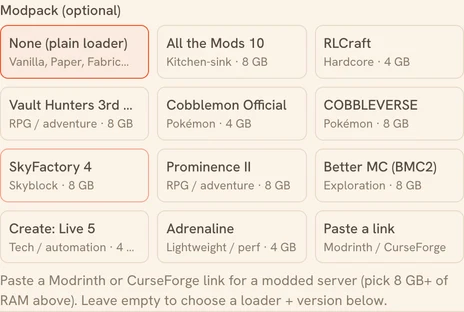
Ten packs are offered directly, with no link to hunt down:
| Pack | Loader | Minecraft | Genre |
|---|---|---|---|
| All the Mods 10 | NeoForge | 1.21.1 | kitchen-sink |
| COBBLEVERSE | Fabric | 1.21.1 | Pokémon |
| Cobblemon Official | Fabric | 1.21.1 | Pokémon |
| Vault Hunters 3rd Ed. | Forge | 1.18.2 | RPG |
| Prominence II | Fabric | 1.20.1 | RPG |
| Better MC (BMC2) | Fabric | 1.20.1 | adventure |
| SkyFactory 4 | Forge | 1.12.2 | skyblock |
| RLCraft | Forge | 1.12.2 | hardcore |
| Create: Live 5 | Forge | 1.20.1 | tech |
| Adrenaline | Fabric | 1.20.1 | performance |
RAM: what the server actually gets
Here's the most useful thing in this guide, and the one no modpack page explains.
When a pack author writes "allocate 8 GB", they mean the JVM heap (-Xmx) — not the machine's memory. And the two are never equal: the operating system, Docker and Java's own off-heap memory (metaspace, buffers) live beside the heap. Give all the RAM to the JVM and the kernel will kill your server mid-game.
So the heap is worked out for you, and it equals the smaller of "RAM − 2 GB" and "75% of RAM":
| Tier you pick | Actual JVM heap | What it covers |
|---|---|---|
| 4 GB | 2 GB | vanilla, or a very light pack |
| 8 GB | 6 GB | Cobblemon, RLCraft, Create: Live 5 |
| 16 GB | 12 GB | All the Mods, COBBLEVERSE, SkyFactory |
| 32 GB | 24 GB | big pack plus a large group |
Always translate in that direction: a pack asking for 8 GB of heap does not fit the 8 GB tier, which only yields 6 — it needs the 16 GB tier. That's why the creation screen warns you when the tier you picked doesn't cover the pack: it compares heaps, not machine sizes.
And if exploring stutters while the heap is comfortable, memory is no longer the problem — the CPU is. The dedicated CPU level exists for that.
The first boot takes fifteen to twenty-five minutes
It isn't "crashing". On its first boot a modded server downloads the pack, resolves mod dependencies, writes the configuration, then generates the world — and generating a modded world is far heavier than a vanilla one, because every mod adds its own structures and biomes.
A vanilla server is ready in 1 to 2 minutes. A big pack takes 15 to 25 minutes. Later boots are quick, the world already being there.
This is the classic phantom failure: people assume it failed, kill it, start over, and never finish that first boot. Let it run to the end.
What's kept, and what isn't
The data directory is archived before every shutdown and restored on the next session, with a save-all flush immediately before archiving. An automatic backup runs every 30 minutes while you play, of which the last 5 are kept.
What is deliberately not archived: the server's libraries and binaries, which the image re-downloads each session. Your archive holds only what's yours — world, configuration, mods — and stays small as a result.
Changing pack, or going back
A modded world is inseparable from its mods: loaded without them, it loses its blocks, permanently. So don't switch packs on an existing world — create a second server. And if you're importing a modded world from elsewhere, paste the same pack at the same version before the import: see the world migration guide.
Ready? Create your Minecraft server and paste your modpack. Your first session is free.